Data lakes: Hive is not an RDBMS, HBase 141x faster, Spark's role in practice
You know that moment when business pushes for a “data lake” and expects it to work like their beloved SQL Server? They want to run complex queries, do random updates, and get instant results. Then reality hits.
Hive doesn’t support UPDATE on external tables. HBase’s shell makes you want to cry. Spark requires actual programming. Suddenly, the $500K Hadoop cluster sits there while everyone complains it’s “too slow.”
I’ve seen this play out multiple times. The problem isn’t the technology - it’s using the wrong tool for the job. You wouldn’t use a hammer to cut wood, yet teams constantly try to use Hive like it’s Oracle.
This post shows you the real performance characteristics of Hive, HBase, and Spark on the same dataset (9.6 million NYC taxi records). You’ll see:
- Why Hive isn’t an RDBMS (and why ACID support is limited)
- When HBase is 141x faster than Hive (and when it’s 5x slower)
- What Spark actually optimizes for
- Which tool to use for your actual use case
Benchmarks included: Real performance numbers on single-node Cloudera with 12 cores, 25GB RAM.
Why this matters
Here’s the typical data lake journey:
Phase 1: Excitement
- “We’re migrating to Hadoop!”
- “We’ll have a data lake with all our data!”
- “It’ll scale to petabytes!”
Phase 2: Reality
- Business analysts can’t run their SQL queries
- UPDATE/DELETE doesn’t work
- “Why does this query take 4 minutes?”
- “Our SQL Server was faster”
Phase 3: Blame game
- “Hadoop is too slow”
- “The tools are too complicated”
- “We should’ve stuck with Oracle”
The problem? Organizations build data lakes but don’t understand which tool to use for what. They try to use Hive like SQL Server, HBase like MySQL, and wonder why performance is terrible.
The real questions nobody asks:
- Where’s our data? How many systems? How are they connected?
- Who understands the data? Do we have metadata?
- Which technologies fit our actual access patterns?
- What are our ETL requirements?
- Which tool matches our query patterns?
Let’s assume you’ve built your data lake. Your data is on the cluster, Sqoop jobs run like clockwork, Kerberos is terrorizing IT (as usual), and everything lives in one place. Great.
But now what?
You have options:
- Hive - SQL-like queries on HDFS
- HBase - Key-value NoSQL database
- Phoenix - SQL layer on top of HBase
- Spark - General-purpose processing engine
- Impala, Kudu, Pig, Cassandra, Accumulo - Specialized tools
Each one has different use cases, different performance characteristics, and different mental models. Picking the wrong tool means either terrible performance or endless frustration.
This post tests three core tools (Hive, HBase, Spark) on the same dataset to show you their actual strengths and weaknesses.
The dataset: NYC taxi trips
We’re using public NYC taxi trip data: NYC TLC Trip Record Data
Specs:
- 3 months of data (April-June 2017)
- Yellow cabs only
- 29,805,311 records total
- 2.5GB compressed
- For testing: June 2017 only (9,656,995 records, 813 MB)
We’ll run the same query on each tool: “Find all trips with tips over $100”
This tests aggregation performance (COUNT, MAX, GROUP BY) which is common in analytics workloads.
Part 1 - Hive: not an RDBMS (stop trying to make it one)
A short prefix for Apache Hive
When it comes to Hadoop, the transition is hard. One might argue that one of the, if not the, hardest thing about a transition from traditional DWH to Hadoop is not the technology, but rather the way people use it. That being said, the first thing that comes to mind when you transition from relational systems to Hadoop might just be Apache Hive – a mostly ANSI-SQL compliant tool that allows you to fire SQL queries on your HDFS data.
First off: Hive is a fantastic piece of software that comes with a lot of flexibility. It runs on your laptop (well, it does on mine…), on a legacy cluster powered by good old M/R2 just like it does on a modern, Spark or Tez fueled powerhouse. It makes it easy to work with any data you might have, from legacy CSVs or AS400 Sqoop imports to complex Avro-magic.
So, why not just use Hive like you would, say, a Microsoft SQL Server?
Because Hive. Is. Not. A. RDBMS. I cannot stress this enough. Hive uses Schema-On-Read mechanics, does not have the concept of keys (and that is, well, key!) and is not ACID compatible out of the box. You are also responsible for managing the underlying system. In the next section, we will dive into the details of what exactly that means.
Hive
We will use the following data set: http://www.nyc.gov/html/tlc/html/about/trip_record_data.shtml
Data about the famous NYC cabs!
For 3 months, 2017-04 to 2017-06 for all Yellow Cabs, it boils down to a total of 29,805,311 records in 2.5GiB. If we start with June, we still get 813 MiB and 9,656,995 records.
As we will re-use the same data set for HBase later, you will need to make sure your HBase Key is unique – if you just use the first value in the CSV, VendorID, you will get a total of 3 records – as there are 3 distinct values in that CSV for this column. So we need to add an ID using awk. I suggest using head -1000 and piping that to a separate file for testing if you want to follow along.
| |
Now, we need to create a DDL and import the data:
| |
Oops. Not good. Wait, let’s just enable transactions! However, you will have issues doing that using Cloudera’s distribution. Take this exempt from the documentation:
_“The CDH distribution of Hive does not support transactions (HIVE-5317 ). Currently, transaction support in Hive is an experimental feature that only works with the ORC file format. Cloudera recommends using the Parquet file format, which works across many tools. Merge updates in Hive tables using existing functionality, including statements such as INSERT, INSERT OVERWRITE, and CREATE TABLE AS SELECT.”
In the interest of transparency, here is how it looks on a manual Hive setup directly on Fedora (On a related note: Hortonwork’s HDP does support it out of the box):
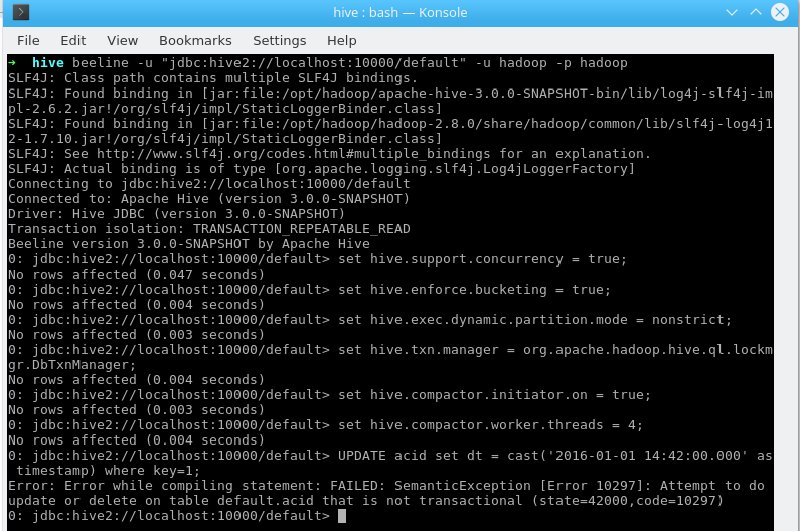
If you take a look at the official Hive documentation, the limitations become even more apparent:
- OnlyORC file format is supported in this first release. The feature has been built such that transactions can be used by any storage format that can determine how updates or deletes apply to base records (basically, that has an explicit or implicit row id), but so far the integration work has only been done for ORC.
- By default transactions are configured to be off. See the[Configuration](https://cwiki.apache.org/confluence/display/Hive/Hive+Transactions" \l " HiveTransactions-Configuration)section below for a discussion of which values need to be set to configure it.
- Tables must bebucketed to make use of these features. Tables in the same system not using transactions and ACID do not need to be bucketed. External tables cannot be made ACID tables since the changes on external tables are beyond the control of the compactor (HIVE-13175 ).
- Reading/writing to an ACID table from a non-ACID session is not allowed. In other words, the Hive transaction manager must be set to org.apache.hadoop.hive.ql.lockmgr.DbTxnManager in order to work with ACID tables
- ([https://cwiki.apache.org/confluence/display/Hive/Hive+Transactions#HiveTransactions-ConfigurationValuestoSetforINSERT,UPDATE,DELETE](https://cwiki.apache.org/confluence/display/Hive/Hive+Transactions" \l “HiveTransactions-ConfigurationValuestoSetforINSERT,UPDATE,DELETE))
While reasonable, it does strengthen my argument – Hive is not an RDMBS, even though you might be importing relational data. ACID compatibility is possible, but limited to some fairly specific use cases.
As long as you are using bucketed (often via a Primary Key from source), ORC-based, managed tables on a distribution that supports this, you are doing great. If you start with more uncommon Hadoop use cases, you might – will – run into issues.
So, how do organizations get around this? Usually, you can play The Tower Of Hanoi – meaning, using temporary tables and sub-selects to work with INSERT OVERWRITE statements, use a different storage and execution strategy that enables random writes and updates (more below) – or you can make this a core target and focus on matching the requirements outlined above.
When going for the first approach, there might be some…
| |
In any case, sooner or later you will find yourself in need of working with your now accessible data. If you call this process “mapping”, “transformation” or just throw your entire ETL workload on Hadoop, eventually you will want to gain some form of insights from your Lake – and usually, this involves Joins, Views and other SQL operations.
Hive on 9,656,995 records
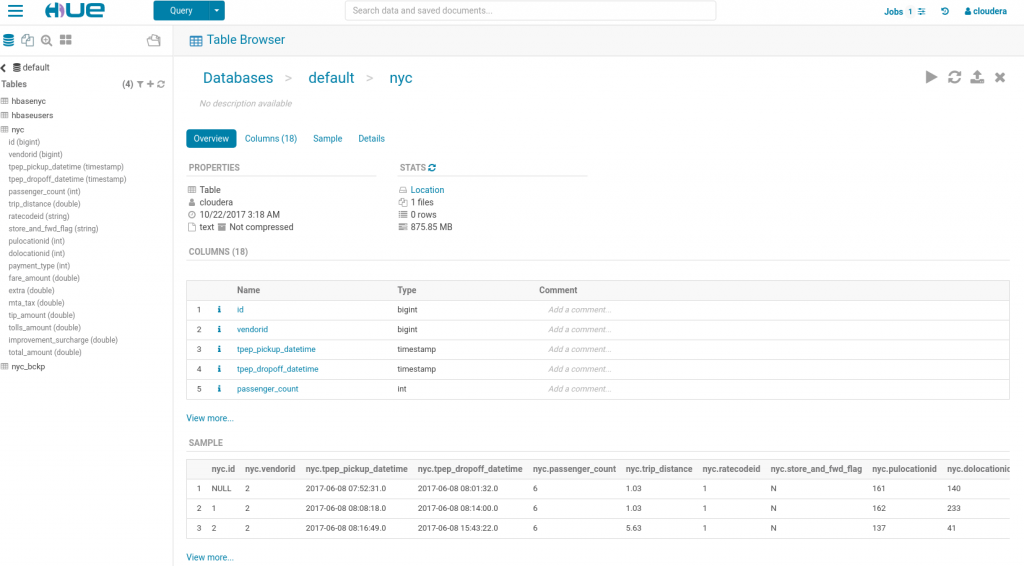
Let’s get back to our data. Always keep in mind that this data is currently stored as plain text.
Let’s try to get all trips with a tip over $100 – it’s NYC, after all:
| |
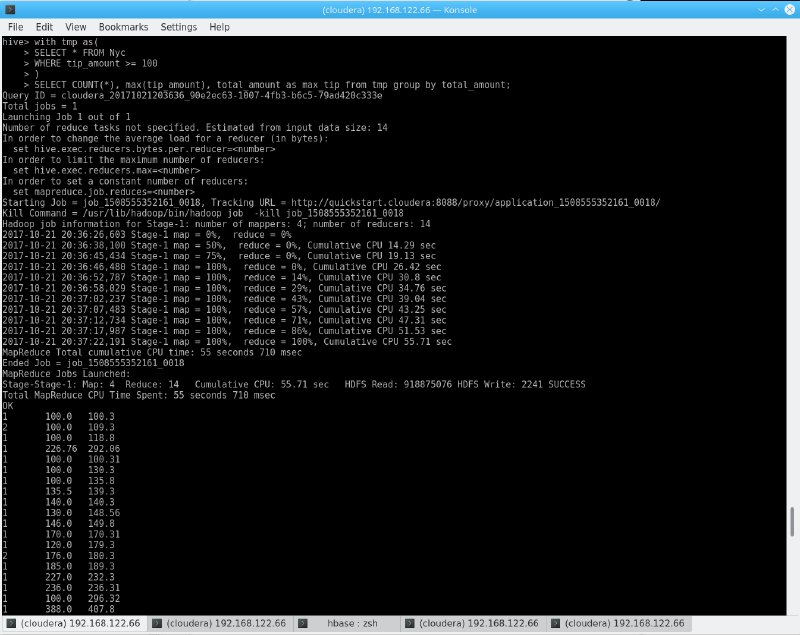
Time taken: 66.138 seconds, Fetched: 185 row(s)
We got a result in about a minute on a single node (cluster configuration can be found down below)!
As you can see, I use a less-than-shiny, white-on-black CLI. So, let’s assume we have business users and analysts which are used to complex, powerful tools such as MS SQL Management Studio.
We can provide access to business users using Ambari (Hortonworks), Hue, Zeppelin or other web-based front ends.
However - storing queries, simply exporting results, auto-complete, stored procedures, special characters and (in most cases) visualization are not features that are commonly found on these tools.
You will need an external tool, usually connected via JDBC, for that. Examples include Dbeaver, Squirrel or Dbvisualizer. Keep in mind that these tools need to talk to Hive (standard port 10000) and are usually Kerberos enabled – and generally speaking, Kerberos really, really hates nice things. It also hates bad things, in many cases, that would be Windows.
To get a bit more serious – transitioning your seasoned analysts to Hive is not an easy task. The technology is fundamentally different, the available tool sets do not offer the comfort many of us got used to over the years and seemingly simple functionality appears to be missing. It is really challenging to explain that Hive does, in fact, does not have the concept of “NULLable fields” or even Primary Keys, not to mention the highlighted ACID problematic or missing features from other SQL dialetcs.
However: Hive offers different benefits. It is heavily optimized for huge datasets and will not blow up for very large tables (the 9M records from our example might be a good start for a VM, but is not a representative volume!), can be easily extended by simply plugging more machines in your cluster, is fully Open Source, can directly work on various other data sources that are not managed by Hive (External Tables, see below), is integrated in basically any Big Data related technology (Sqoop even creates your tables and DDLs for you when importing data from an RDBMS), can be your entry point for Machine Learning on structured data, and serves as key component in any data lake.
So: You should use Hive. But do not expect it to work like MariaDB or Oracle. Do not expect setting up a Data Lake involving a couple of Hadoop Experts that know Hive in-and-out and to receive good feedback from business. As always, communication is key.
Use Hive to access your data, to transform your data (though not necessarily directly via the CLI), to provide external access via JDBC to end users (using the right tool – OpenSource or proprietary), and as major workhorse for your Data Lake for anything that even resembles relational data.
But remember – it is not an RDMBS. It was never meant to be that. It is not going to replace anything – it is a piece of technology that requires some careful planning and coordination between both IT and business. Maybe you even want to move your results to a different database, visualization tool or warehouse that works better with your Analyst’s toolset of choice – it all depends on what you are trying to do. But ultimately, you will be rewarded with a system which bridges the gap between abstract, distributed data and related algorithms such as MapReduce and the SQL we all learned to love and hate.
HBase and other non-relational databases
But obviously, there is a world beyond relational data. Enter the world of “noSQL”.
If you ever had the chance to use a production HBase cluster, there’s pretty much two scenarios. One: You love it because it was used exactly like it was meant to. Two: You hate everybody committing to it and burn Lars’ book on occasion (which, by the way, I can only highly recommend).
Non-relational systems, especially the Column-oriented varieties, like HBase, MongoDB, or Accumulo are a fantastic concept. Usually, there is no concept of ACID transactions, but are hellishly fast if used right.
If we use HBase, a de-facto standard on Hadoop, as an example, we can quickly see what “used right” means and apply some common access patterns on our NYC cab data. For details on HBase’s architecture, I will again refer to Lars George’s book, “HBase – the Definitive Guide” (O’Reilly Media).
In general terms, noSQL systems heavily rely on the concept of a key – and therefore, doing exactly what Hive omits for good reasons. Now, what is true about Hive – that it does not come with a fancy client – is especially true for HBase.
A seemingly simple query like “get me all records where X” turns into a long, horrible orgy of sub-commands over a charming black-and-white CLI.
We’ll re-use our NYC Yellow Cab data set (the Hive import from above moves the data set, so you will need to copy it to HDFS again).
| |
One might add that the initial import took plenty of time on the Quickstart Configuration, which, granted, is not very good. The command also exits with Bytes Written=0 if something is wrong (like a mismatch in the columns) – do not pass Go. Do not collect$200.
Again, let’s get all trips with a tip > $100.
| |
What’s that?
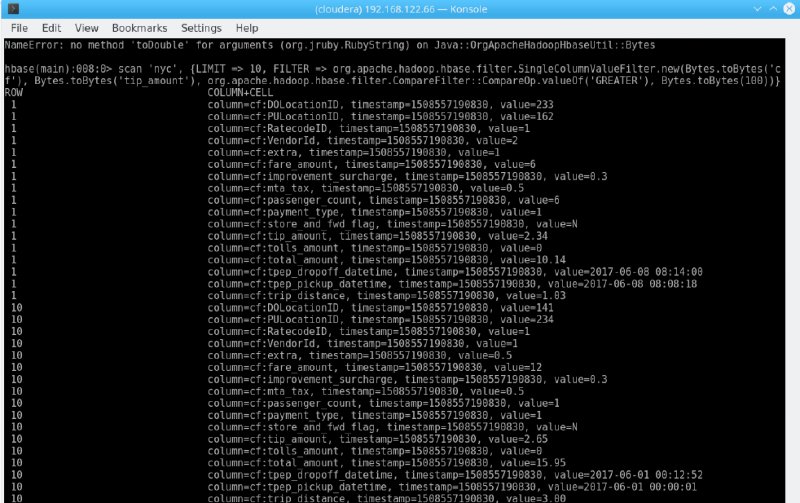
What happened here? Using the TSV import command, all the values are imported as Strings – and we are trying to compare Strings with Bytes. Technically correct, but not very insightful. There is a whole lot more to the way HBase stores its data – I will not go into that at this point. But just keep in mind that HBase does not really care about the data you throw at it.
So, let’s use Java, the next low-level abstraction HBase offers. We implement a custom Comparator to work with Double in
String fields, move that jar to HBase’s classpath, restart HBase and run our query as jar file. Make sure to set
hbase.client.scanner.timeout.period hbase.regionserver.lease.period accordingly.
| |
Implementing the custom Comparator sounds like a simple exercise, but believe me, I had to read a lot of HBase source code in order to get that working. Also, Protobuf. We’ll forge that into a separate article.
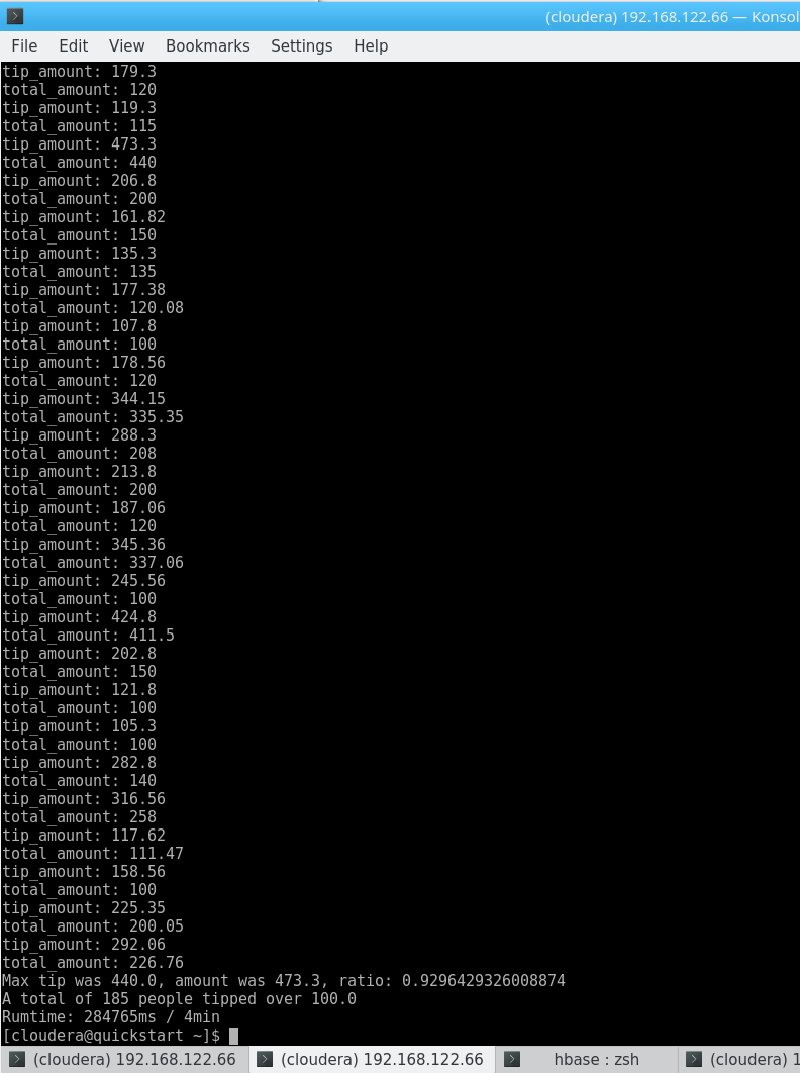
| |
A total of 185 people tipped over 100.0
About 5x the runtime of Hive. I need to add at this point that using a HBase client application is not a very efficient way of working with this data in itself and that I threw together that jar in a couple of minutes (which it why it screams “Kill me!”) – but since my test environment is running on a single node anyways, we will let this slide.
However, this comes back to my point about keys and hence data access patterns. We are using a monotonically increasing, artificial, meaningless key. It’s like assigning each record in a pile of loose vinyls a increasing number and expecting to find something quick. Sure, it works eventually – but not efficiently.
Let me demonstrate this by getting the (chosen-at-random) key “200000”:
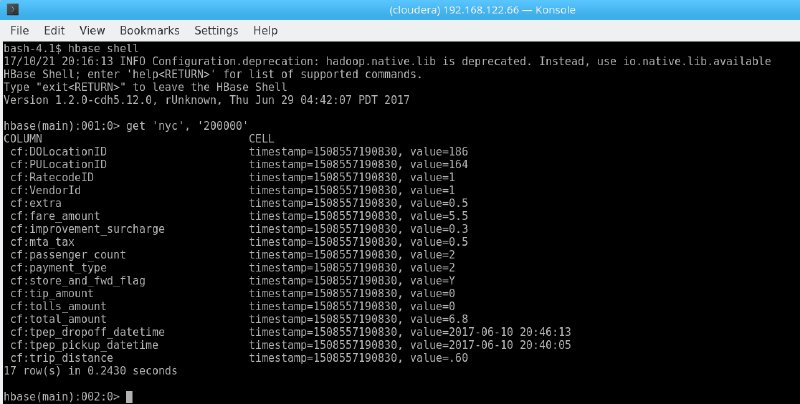
0.24s isn’t bad at all. Running a similar query in our (seemingly) quicker Hive table from above looks like this:
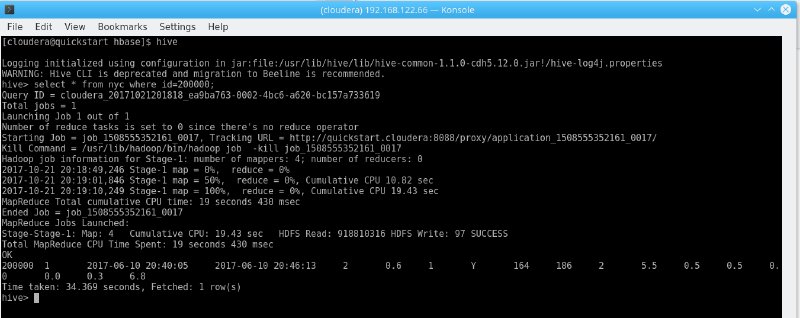
34.4s! In other words, 141x HBase’s runtime.
The same finding applies for scanning multiple rows – using
| |
to get all rows from 200,000 to 200,020 takes 1.9s in my example, the majority of what would be printing to the shell.
In real life, we would probably use a meaningful HBase key, such as the trip’s time if we are interested in analyzing the data based on date and time (on nanosecond precision in order to avoid duplicates). We could ask HBase “get me all trips from 2017-07-04 18:00:00.000 to 2017-07-05 01:59:59.000 and show me the average fare” if we want to take a look at 4th July fares at night.
Anyways – while HBase also answers my initial query, the Java method is highly inefficient as well:
- The query runs client-side (as mentioned above)
- We needed to essentially customize HBase or at least work around our data type issues (there’s other ways to achieve this, but your choice of technology will eventually limit your ability to gain these insights)
- We need to write a custom program in Java
- While it is almost easier than daisy-chaining commands in a shell, it is still fairly complex for such a simple query
SQL on noSQL
But what about SQL? Well, you can use Hive again by pointing an external table to HBase – I just don’t recommend it for this use case. First, we need an external table (a table that does not manage data, but rather just points to an existing data source), mapping our HBase columns to Hive columns:
| |
The query certainly is easier to manage, but the performance is also not great either:
| |
And the explanation remains the same: Column-based random-access is not what HBase was built for.
HBase is really fast on any access that involves a key, on a lot of inserts and even “updates” (which are really overwrites), can manage billions of rows, and is incredible flexible, as it does not dictate a fixed schema apart from ColumnFamilies. You can literally make up columns and data types as you go.
One alternative is Apache Phoenix, an SQL layer on top of HBase that takes care of a lot of optimization for you. I will not go into detail at this point – but the key finding (pun intended) remains the same. Using HBase while expecting random-read queries is a bad idea!
I guess what I am trying to say – usability is not HBase’s primary target. And it doesn’t have to be. As my “ID 200,000” example shows, HBase wipes the floor with Hive when it comes to very precise lookups, it’s flexibility due to the lack of schema is incredible and it will not let you down on very large data sets – if you make sure you know exactly what you are after.
Apache Spark
First off, Apache Spark is a general-purpose processing engine. Comparing it to other technologies is not really a good start, as it serves many purposes, such as -
- Programming interface for data access, ETL, Machine Learning and more
- Execution Engine (for Hive)
- Streaming data
- Machine Learning
I’ve used Spark many times and it remains one of my favorite, to-go tools in the Big Data zoo – mostly because it can do almost anything and is usually very fast, due to some very smart optimizations and techniques under the hood.
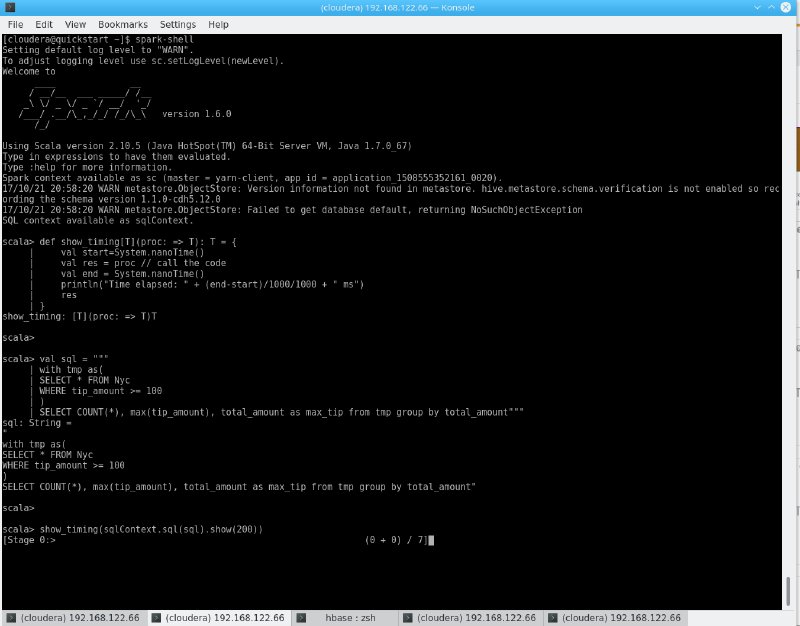
Without further ado, we will replace M/R2 from the Hive example above with the Scala-based Spark shell (basically, a live shell you can get by running $ spark-shell) and fire the same query:
| |
| |
12s for the exact same result. Of course – we already spent time on Hive prior to this, but the same result with a slightly different performance outcome could be achieved by reading the CSV from HDFS directly! Using Spark 2 makes this easy, but we can use the default 1.6 as well, as installing Spark 2 on Cloudera be a bit tricky.
So we use the databricks-csv
library:
spark-shell --packages com.databricks:spark-csv\_2.10:1.5.0
And this bit of code:
| |
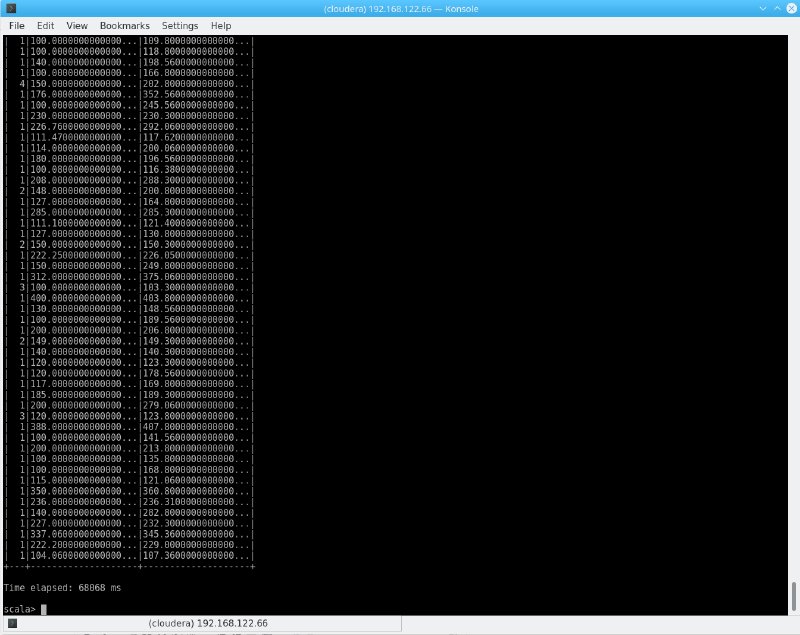
As you can see, the performance is not exactly a miracle and we had to manually define a schema, as we removed the CSV header – but keep in mind that this approach directly reads your CSV from HDFS, basically skipping Hive altogether. While aggregates might not be the key use case here, this is a very neat feature to work with various files directly on Spark.
In order to answer our “200000 key question”, the same query in Hive is not very convincing either:
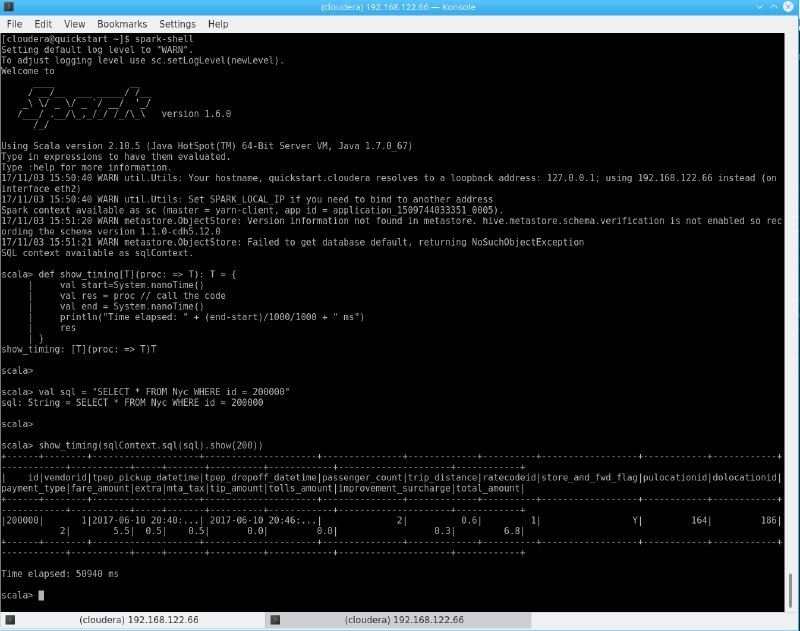
Another 50s.
And for good measure, the same on the CSV:
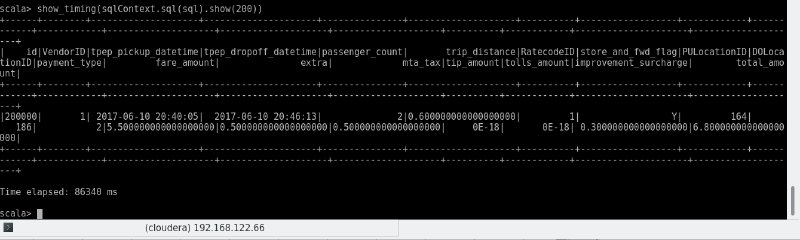
And even better, knowing just a bit of Scala, we can do much more with that data – we could store it in a DataFrame, do more analysis on there, write it to disk, connect it to other sources, read from a completely different file from disk without any involvement of Hive whatsoever, combine those results, transform the code into a Real-Time application and much more.
We can use Spark on Python, Scala, Java and R, can run it from a web front-end such as Apache Zeppelin or just build mighty, full-size applications that involve build servers and more unit tests than you can imagine even in your wildest dreams.
But again – while the above example surely is simple, really complex Spark applications will result in full-sized software projects. But whether it is a simple Script or a complex application, Spark will serve your end users familiar with SQL (especially on a graphical tool like Zeppelin) as well as your Data Scientists and Engineers.
Talking about Spark in a couple of paragraphs does not do it justice, but the gist of it is: Simple to use (although not as intuitive as a Microsoft SQL client) quick results, hard to master, and very powerful – but not exactly Microsoft SQL Management Studio either.
Conclusion
Let’s summarize: Using a fancy toolset doesn’t help anybody if it’s not used accordingly. Not surprising!
It gets even more apparent when we sum up our benchmarks:
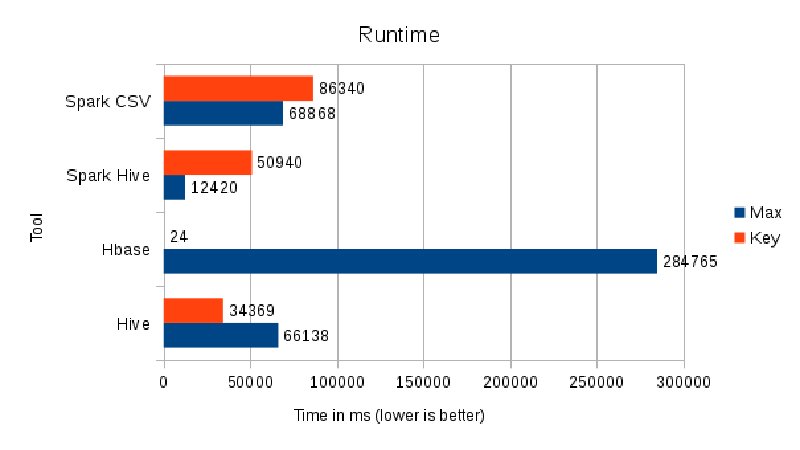
Hadoop does not magically solve your problems. Period. It does, however, provide a very powerful foundation for many years to come, especially when you think beyond your usual DWH Reporting targets.
Generally speaking -
Use Hive for “standard” queries – it gets as close to an RDBMS as you’re going to get. With ACID enabled and a smart use of Bucketing and Partitioning instead of traditional Primary Keys where applicable, using a good choice of ETL rules (avoiding VARCHAR join conditions, for instance), it serves as powerful, easy-to-use access layer to your Data Lake, especially in combination with a tool like Dbeaver. Do not expect it to make business users happy without proper Change Managstrongent.
It also opens the gate for much more advanced use cases: As starting or end point for your Machine Learning algorithms ( which might very well combine structured and unstructured data), for instance.
HBase is clearly targeted at developers, but can also be exposed to end-users – if you know what you are doing. While amazing at certain things, HBase (and Phoenix) need to be used for use cases where you know your access and ingestion patterns – but if done right, it will not let you down.
Spark got (hopefully) a bit demystified. Spark, ultimately, is an Execution Engine. As such, it is, again, targeted at developers. However, using smart tools like Zeppelin and the SparkSQL free-form SQL interface, it can surely be used by many Database Architects and Power Users that are willing to handle a bit more coding than usual.
Independent of the toolset, the well-known Hadoop benefits still hold true today – runs on commodity hardware, super-scalable, very robust and Open Source.
So, is the concept of a “Data Lake” and especially Hadoop right for you? I’ll tell you what I tell all my clients: It depends. But it is certainly worth a look, especially if you expect your data to grow and your reporting needs to evolve.
There is a ton of topics I did not even mention in this 4,000 word article – but rest assured that a business that knows how to make use of more than their standard “reporting” interfaces and ERP- and CRM-extracts will gain a competitive advantage in the marketplace – as we all know, knowledge is key!
All tests were done on a single-node Cloudera Quickstart VM, running on QEMU/KVM with 12 AMD Ryzen 1700 vCores @ 3.2Ghz and 25GiB RAM, image launched from a 3TB WD RED Raid-1 Array under Fedora 26. yarn.nodemanager.resource.memory-mb was set to 4GiB, yarn.nodemanager.resource.cpu-vcores to 10
TL;DR
- The problem: Data lakes fail when organizations use the wrong tool for the job (Hive like SQL Server, HBase like MySQL)
- Benchmark dataset: 9.6M NYC taxi records, testing “tips over $100” query
- Hive: 66s for aggregation query, great for SQL-like queries on HDFS, but NOT an RDBMS (no PRIMARY KEY, limited ACID support, schema-on-read)
- HBase: 4.7min for column scan (5x slower than Hive), but 0.24s for key lookup (141x faster than Hive’s 34s) - use for key-based access, not random queries
- Spark: 12s for same query (5x faster than Hive), can read CSV directly without Hive, requires programming but extremely flexible
- Key insight: HBase crushes Hive for key lookups but dies on column scans; Hive is fast for aggregations but isn’t an RDBMS; Spark is fastest overall but needs code
- When to use Hive: SQL-like analytics on large datasets, ETL workloads, bridge between MapReduce and SQL
- When to use HBase: Key-based lookups, billions of rows, flexible schema needs, high write throughput
- When to use Spark: Machine learning, ETL, streaming, when you need full programming power
- Lesson: Understand access patterns before choosing tools - benchmarks don’t lie, but using a hammer to cut wood will always suck